

Spotify Connect stopped working? Keep your streamer.
Restore Spotify playback on compatible Linux and audiophile streamers without replacing the hardware you already own. Spotycast reconnects Spotify to your existing audio system through a stable radio endpoint or a direct renderer backend.
Keep your existing audio ecosystem
Spotycast is designed for music systems whose Spotify Connect integration is broken, unreliable or no longer maintained. Whether you use Roon, Volumio, Squeezebox, LMS, MPD or an OpenHome renderer, the goal is to preserve your existing playback chain.
Two ways to restore Spotify playback
Choose the path that best matches your existing audio system. Both editions move Spotify integration away from the legacy device.
The universal radio approach
Classic creates a standard Icecast HTTP audio stream that can be consumed by compatible internet-radio players.
- Spotify Connect source powered by spotifyd
- Audio routed through Liquidsoap and Icecast
- Stable HTTP radio endpoint on your network
- Lossy Spotify source, up to approximately 320 kbps
- Useful for Roon Live Radio, LMS, Volumio, moOde and other HTTP-compatible players
Direct renderer integration
Premium uses Soloist, PipeWire and independent renderer-specific backends rather than relying on a single Icecast output.
- Squeezelite / LMS backend
- MPD / Volumio / moOde backend
- Dedicated Roon backend
- OpenHome / UPnP backend
- Lossless-capable source path where Spotify and the receiving chain support it
Premium requirements: A Spotycast Premium installation key and a separate Soloist API key are required. Actual lossless playback depends on the Spotify client, account eligibility and end-to-end audio configuration.
Spotycast Premium in action
Manage renderer backends locally and select Spotycast endpoints directly from the Spotify app. The screenshots below show the existing Spotycast Premium Manager and Spotify Connect interface.
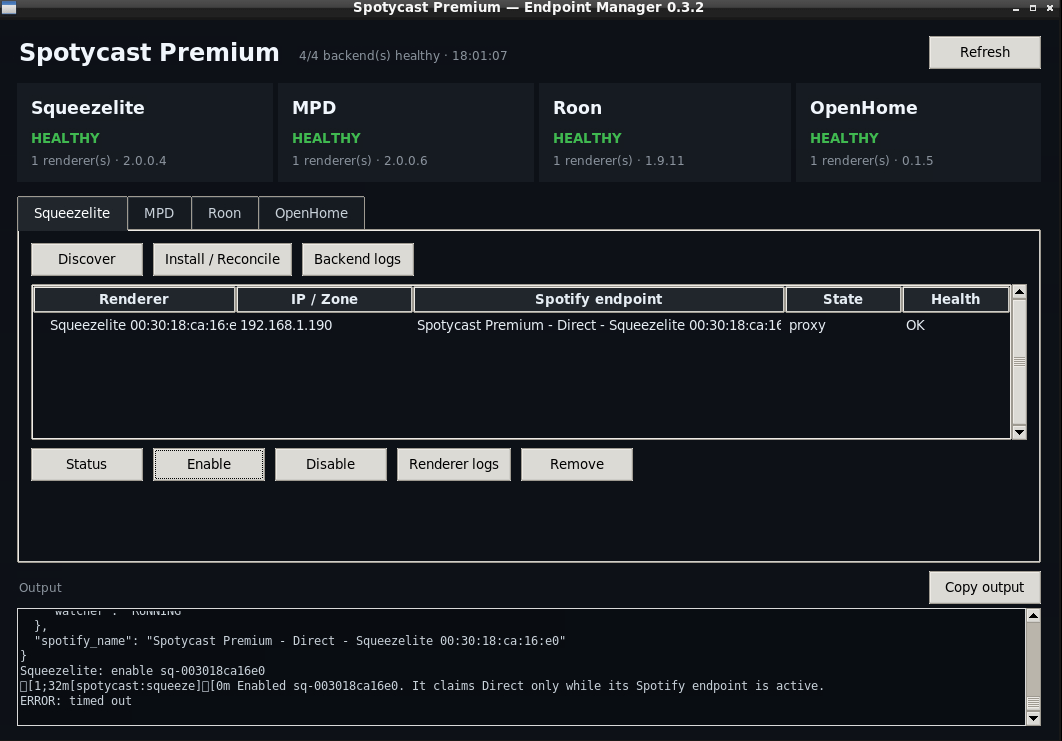
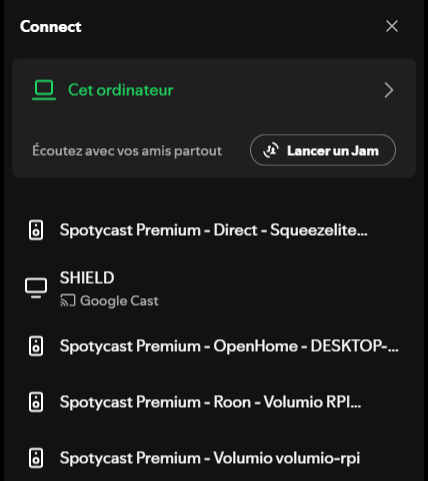
Why keep your existing streamer?
Preserve good hardware
A high-quality network player can remain perfectly capable of playing music long after its native Spotify integration has stopped working.
Separate Spotify compatibility
Move the changing Spotify-facing software to a maintained Linux host rather than relying on abandoned plugins or firmware updates.
Retain your audio workflow
Keep compatible Roon, LMS, MPD and OpenHome playback chains, including existing library and audio-processing configurations where supported.
Technical architecture and limitations
For readers who want to understand the implementation, technical details are available below without overwhelming the initial presentation.
How does Spotycast Classic work?
Classic follows the chain: Spotify → spotifyd → local audio → Liquidsoap → Icecast → HTTP radio endpoint. This creates a reusable audio URL for compatible network players and radio inputs.
The source is lossy, with Spotify’s supported bitrate reaching approximately 320 kbps. See Spotify to Icecast.
How does Spotycast Premium 3.0.6 work?
Premium follows the architecture: Spotify → Soloist → PipeWire → renderer backend. Spotycast Core and the Manager orchestrate the services, while PipeWire Sink Builder prepares the audio sink used by the relevant backend.
Squeezelite, MPD, Roon and OpenHome / UPnP are independent playback paths. Squeezelite, MPD and OpenHome fresh installs have been validated; the Roon installation supports non-interactive setup and automatic IP detection.
See Spotycast Premium and How it works.
Does Spotycast Premium support Spotify Lossless?
Premium uses a Soloist-based Spotify-facing architecture that can provide a lossless-capable path when supported by the official Spotify client and account. Actual output quality depends on the upstream source and the complete receiving audio chain.
Direct transport does not automatically guarantee bit-perfect audio, and Spotycast cannot enable lossless availability that Spotify does not provide.
Are Antipodes, Innuos, LUMIN, AURALiC and SOtM compatible?
Compatibility must be evaluated by model and playback protocol. These brands represent relevant audiophile environments, but their entire product ranges are not claimed as tested or supported.
A suitable Roon, LMS/Squeezelite, MPD, OpenHome/UPnP or HTTP radio receiving path is required, depending on the edition.
Is Spotycast a cloud streaming service?
No. Spotycast is a self-hosted compatibility bridge intended for personal network audio. Spotify remains the music service and playback controller. Spotycast does not supply a separate music catalog and is not intended for public broadcasting.
Frequently asked questions
Can Spotycast help when Spotify Connect stops working on Linux?
Yes, when the existing streamer can still receive audio through one of Spotycast’s supported output paths. Spotycast moves the Spotify-facing integration to a maintained Linux host and routes audio to the existing playback ecosystem.
Can Spotify Connect work with Roon through Spotycast?
Yes. Premium has a dedicated Roon backend. Classic can also be consumed as an HTTP radio stream using Roon Live Radio. These approaches differ in their integration and latency characteristics.
Does Spotycast work with Volumio and moOde?
Classic supports compatible HTTP radio inputs, while Premium provides an MPD-oriented backend for compatible playback environments.
Do I need to replace my existing audio player?
No, provided it still supports a compatible receiving protocol. Preserving capable legacy audio hardware is the principal use case for Spotycast.