
Spotycast Premium: restore Spotify Connect on legacy audio systems
Keep the Linux streamer, DAC or audiophile playback system you already trust. Spotycast Premium relocates the Spotify-facing integration to a separate Linux bridge, routes audio through Soloist and PipeWire, then sends it to a dedicated Squeezelite/LMS, MPD, Roon or OpenHome backend. No need to replace functioning audio hardware merely because its built-in Spotify Connect software no longer works.
Premium requires two separate credentials
Spotycast Premium installation key
Enables the Premium edition of Spotycast. Use the existing official Premium access/download workflow.
Soloist API key
Authorizes the Soloist engine that handles Spotify-facing playback. This is a distinct credential and is not included merely by possessing the Spotycast installation key.
How Spotycast Premium works
Premium avoids routing every player through a generic Icecast radio endpoint. A shared Spotycast Core manages the Spotify source, local audio route and selected backend as a renderer-specific stack.
- Spotify / SoloistContinue using Spotify to control playback. Soloist provides the Spotify-facing source and requires its own API key.
- Spotycast CoreCoordinates the source instance, renderer configuration, installation and backend lifecycle.
- PipeWire Sink BuilderPrepares the local PCM audio path and sink needed by the selected backend, rather than using one global output for every player.
- Independent renderer backendConnect to the Squeezelite/LMS, MPD, Roon or OpenHome/UPnP ecosystem supported by the target device.
A real Manager GUI for controlling your renderers
The documented Spotycast Manager 0.3.2 provides a local Tkinter/noVNC graphical interface to inspect configured renderers, enable or disable individual backends, access their logs and remove no-longer-needed components. The screenshot below comes from the existing published Premium page.
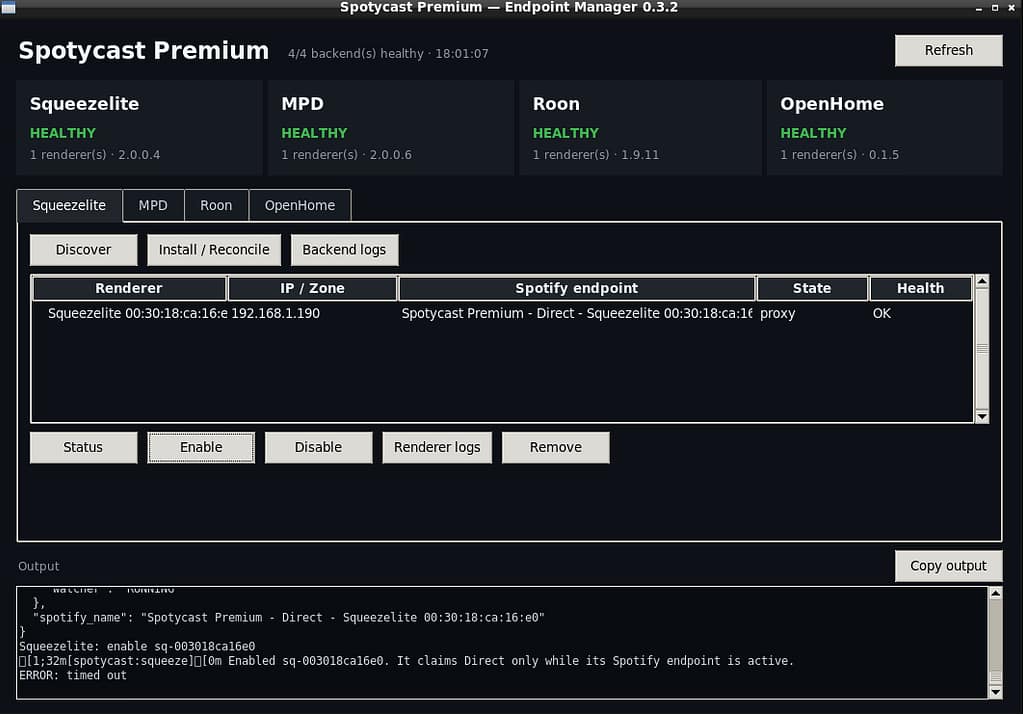
Check status per backend
Inspect the state of the selected playback path instead of treating every renderer as one service.
Enable / disable independently
Manage only the receiving ecosystem you are configuring, without unnecessarily changing unrelated backends.
Renderer-specific logs
Start diagnosis with the backend actually failing and the corresponding local audio route.
Four renderer backends, one Spotycast Core
Squeezelite / LMS
For Lyrion Music Server, Squeezebox and compatible Squeezelite-based playback environments. The published reference reports a validated fresh-install path.
MPD / Volumio / moOde
For supported MPD playback environments. The published reference reports a validated fresh-install path; compatibility depends on the receiving system.
Roon
Dedicated Roon path. The published 3.0.6 baseline documents a non-interactive installer and automatic IP detection; actual transport and latency depend on the Roon environment.
OpenHome / UPnP
For compatible network-audio renderers using OpenHome or UPnP. The published reference reports a validated fresh-install path, not universal model certification.
Classic versus Premium: choose your actual receiving protocol
Icecast HTTP radio
Spotify → spotifyd → Liquidsoap → Icecast → a player that accepts a normal HTTP radio URL.
- Reusable LAN endpoint
- Compressed upstream source, up to approximately 320 kbps
- Radio-style buffering and receiver-dependent delay
- Good when the player already supports a radio stream
Direct renderer backends
Spotify → Soloist → Spotycast Core / PipeWire → supported renderer backend.
- Dedicated Squeezelite, MPD, Roon and OpenHome paths
- Independent backend management
- Potentially lossless-capable source path when available
- Two distinct installation/API credentials required
Lossless-capable does not mean guaranteed lossless
Premium is designed to preserve the best supported Spotify-facing source path exposed by Soloist and to avoid unnecessary conversion to Classic’s compressed spotifyd input. But audio quality depends on what Spotify actually delivers and on every stage of the downstream routing and renderer.
Source matters
A lossy Spotify session cannot become genuinely lossless merely by using a FLAC container or an uncompressed PCM output.
End-to-end path matters
Spotify account eligibility, availability, runtime capabilities, PipeWire settings and renderer configuration all affect actual output.
Latency varies
Removing an HTTP radio stage can simplify some workflows, but protocol-specific buffering and Roon/renderer behavior still determine playback delay.
Built for legacy streamers and mixed audiophile systems
A network player can be excellent at local playback long after the vendor stops maintaining its Spotify Connect integration. Premium lets the Spotify-facing software live on another host while the existing renderer remains in service.
Linux servers and VMs
Debian-based, self-managed and virtualized audio environments where maintaining a modern bridge is more practical than changing old device firmware.
High-end streamers
Systems such as Antipodes, Innuos or comparable audio environments may expose a suitable receiving protocol. Brand names do not imply universal model support.
Multiple playback families
Manage supported backend families independently when your network combines Roon, LMS, MPD and OpenHome workflows.
What Spotycast Premium does — and does not do
- A separately maintained Spotify-facing integration using Soloist
- PipeWire sinks and renderer-specific audio routing
- Independent supported backends
- A local Manager for operational visibility
- An alternative path for existing audio hardware
- Rewriting or repairing abandoned streamer firmware
- Universal compatibility with every renderer or model
- Guaranteed bit-perfect or lossless playback in every session
- Zero latency or elimination of all network/audio errors
- An included or interchangeable Soloist API key
Premium frequently asked questions
Does Spotycast Premium depend on Soloist?
Do I need two separate keys?
Is Icecast required for Premium?
Can I manage more than one backend?
Does Premium guarantee Spotify Lossless?
Does Premium replace my Spotify app?